
Kamakura to Enoshima Walk - Tokyo Day Trips
As amazing as Tokyo is, it can get overwhelming, chaotic and at times even feel claustrophobic. If you’re staying here for any length of time, you will need a break and what better place than a trip to the seaside. Although there are numerous options out of Tokyo, this blog will focus on Kamakura and Enoshima.

There are a few ways to do this but having been there a number of times, the most rewarding visit was when I started in Kamakura early in the morning and finished in Enoshima just in time for sunset. Furthermore I would highly recommend walking and not taking the train. Although this is a scenic route, it’s also popular on Instagram and TikTok, meaning that anytime after 10am the train is packed to the point of people being squashed up against windows. I took that train once and it wasn’t fun.

The walk itself is around 10km however can easily double if you include exploring all the side streets. Finally the reason for this specific direction is the sunset from Enoshima is beautiful while in Kamakura early morning light is better in my opinion.

Getting Here
There are many ways to get to Kamakura and the route you take really depends on where you are coming from. With that said the easiest route is from Shimbashi as there is a direct train without any changes. It takes around an hour and a bit to get there but your route choice can impact that. If you intend on doing the walk and are buying journey specific tickets, make sure to get a ticket from Enoshima back to Tokyo. Better yet just get a Suica or ICOCA card that you can top up and use everywhere for everything.

Photography
When it comes to photography there is a lot to shoot here. From still life in the quiet backstreets to surfers, temples, Mt Fuji and more. Having looked through my work from the past 3 trips , I found the majority of photos to sit between 35mm and 50mm (full frame). With that said I have a bunch of photos at 135mm especially with Mt Fuji due to the added compression.


Kamakura
When you first arrive in Kamakura you have two options. If it’s clear, then I suggest grabbing the local train to Shichirigahama Station. You can jump on this train at the same station where you arrived from Tokyo and if you’re early enough it should be pretty quiet.

When you get off at Shichirigahama Station, head down towards the sea and if it’s clear, you will have an amazing view of Mt Fuji.
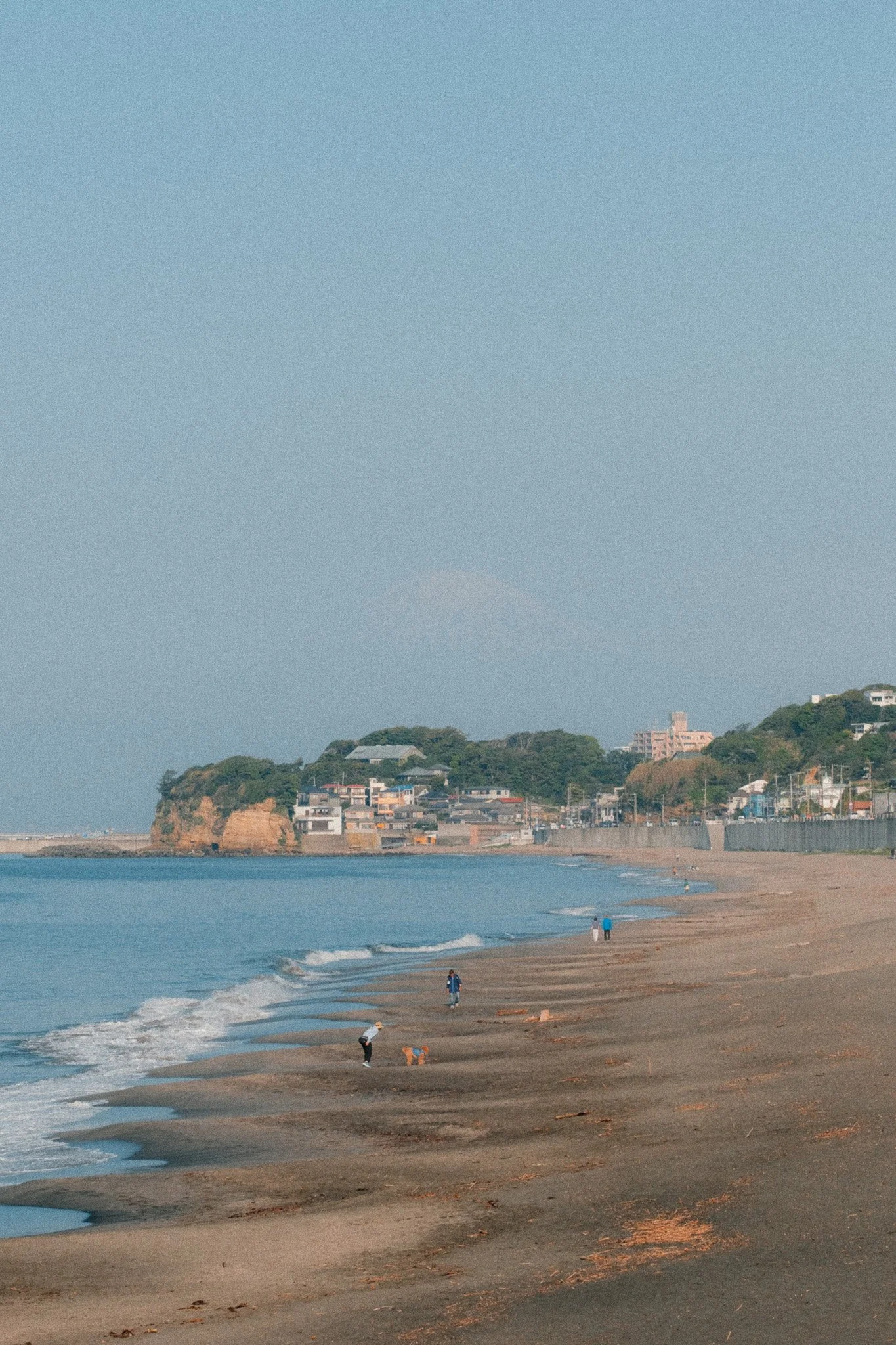
On the day I did this, there was some haze but you could still make it out. If the weather is overcast then I suggest heading to the main temples before the crowds arrive. Specifically Hase-dera Temple and the Great Buddha of Kamakura. Although there are many other temples, these two get the busiest.


From then on I suggest avoiding the main road and getting lost down all the tiny backroads. Eventually they all lead to the sea and in my opinion are more photogenic and interesting than the main street with all the tourists. Just double check on the map before you take one of these back streets as some might be dead ends. With that said some of these dead ends resulted in great photos.


Finally don’t forget to walk up and down the beach especially if the tide is out. Great for photography and so relaxing. Also cool place to spot some sea life or collect shells.


If you take your time and weave around Kamakura, you can easily spend 4-5 hours if not more here. With that said if you’re still in Kamakura by lunchtime, I suggest starting to walk towards Enoshima. If you’re heading towards the sea to start your walk, I suggest popping into Woodberry Cafe for some amazing healthy food and great coffee.

Along the Route
There are two ways to go to Enoshima. First option is to follow the train tracks while the second is to follow the road along the sea. My personal suggestion is to do a mix of both. In some areas you can’t hug the train tracks while in others they weave right through small villages.


I started by the sea and then kept an eye on where the train tracks run through. If it looked interesting, I would quickly walk up to have a look and see if there is a path. There’re 1000 different routes you can take so I will let you explore and get lost.


Enoshima
Enoshima is a little island and you have a few options. Which one you take will depend on how much time you have before the sun sets and whether the boats run or not. My recommended approach is to walk across the island, pop into the observation tower to see the view and then end up right by the sea on the far end of Enoshima. Here you will have some amazing views and if the sea is not rough, you can walk along the rocks.


If the boats are running, you can jump in and head back to the mainland after which you can walk to Katase Nishihama Beach to watch the sunset along with everyone else. If the boats are not running or you won’t have time, then I suggest staying for the sunset and walking back later. Finally head to Enoshima station where there are many trains heading back to Tokyo.




















Instead of telling you how these will change your life, I would rather be practical and answer the most common questions that people tend to have when buying presets.
What are presets?
They are editing settings that are saved in a file and can be applied to any image.
Why do people buy presets?
Sometimes because they like the work of the photographer and want that style for their own photos. Mostly because they would like to see how other people edit and learn by reverse engineering the presets. Other times it’s just to support their favourite photographers, thank you!
What’s the overall style of these presets?
- Filmic
- Warm
- Soft
- Bright
What are these presets suitable for?
Street & Travel Photography
Some Nature (with further editing)
Some Portraits (with extensive editing)
Do I actually use these?
Yes. This is the same pack I use right now for all my editing. This isn’t a pack made just to sell.
Do these presets get updated?
Yes, as my style changes, these presets will also be updated. Any time a new update is available, you will get a free update via email. Of course you also keep all the old presets in case you prefer the older looks. Only presets purchased from 2025 onwards will receive the updates.
What file types are these presets for?
- All RAW files
- JPEGs & TIFFs (not recommended)
What camera brands are these presets for?
These were designed around Fujifilm, Sony, and Leica sensors. With that said, they will work with all camera brands. While there might be differences due to individual camera colour science, the overall feel of the preset will carry over.
Will these work with JPEG files?
Yes, but you will need to reduce the intensity and make further edits. I strongly recommend editing RAW files.
Are these one click edits?
95% No. You would need to do some basic adjustments as each image is different. These adjustments can include exposure, colour balance etc. In 5% of cases you can just apply and leave it alone.
Do I need to know how to edit?
You need to have a basic understanding of adjusting exposure, highlights, shadows, etc. A more comprehensive editing skillset will let you get the most out of them.
How many presets are included?
10 in the main pack and 24 in the extras pack
Why two packs?
The main pack is what I use for 99% of my edits and is kept small to reduce wasted time scrolling through presets. The extras pack is everything I don’t use often.
What software do I need?
These presets will work with any of the following:
- Photoshop (adobe camera raw)
- Lightroom Classic
- Lightroom Desktop
- Lightroom Mobile
Will these presets work with free versions of the above software?
You need to research and double check before buying. These presets were designed for the full paid versions.
Will these presets work with very old versions of the above software?
You need to research and double check before buying. These presets were designed on and for the latest software.
What file type do I get?
XMP
What else do I get?
- Comprehensive PDF guide
Can I modify these and turn them into my own?
Yes! In fact I encourage you to modify them and play around. Use these to help you get your own style.
I have more questions…. What do I do?
Make a cup of tea and drop me an email on hello@snapsbyfox.com
Please note that due to the nature of digital products, refunds are generally not accepted. However, if you experience any issues, feel free to contact me and I’ll review your situation individually. You are welcome to use this product for personal or commercial projects, but you may not copy, distribute, or resell the files in their original or modified form.
Finally I want to say a massive thank you for supporting me. Buying these presets is the most direct way you can support my work.
Thank you!