
Hasselblad X2D 100C Review
A little over two months ago, I got my hands on a Hasselblad X2D 100C digital medium format camera, and in this blog, I’ll share my first impressions after using it exclusively during my Japan trip in October.

Transparency
It’s important to be upfront about my relationship with Hasselblad. They sent me this camera (and some lenses) in exchange for a YouTube video and some Instagram reels. This blog has nothing to do with that arrangement—they don’t know I’m writing it, nor am I under any obligation to say anything specific or to withhold negative feedback. I’ve shared some critical comments with Hasselblad, and I’ll include their responses here. While I didn’t purchase this camera myself, I’m reviewing it as if I had spent that kind of money. If this affects how you feel about this blog, I understand, but I promise to be 100% honest and transparent. I’ll let you decide whether to keep reading.

Purpose
Before diving into specifics, it’s important to consider why this camera exists, who it’s aimed at, and its intended use case. The X2D is designed for slower-paced photography where image quality is paramount. It’s not made for street photography, adventure travel, or wildlife—although it can handle those genres, it isn’t the best tool for the job. This camera excels in environments like portraiture, landscapes, and still life—situations that are methodical and benefit from top-notch image quality.

Coupled with what is arguably the most premium build quality I’ve ever seen—and a price tag to match—the purpose of this camera is clear: to deliver the best possible image quality in the most elegant and minimalistic package. Finally, note that this camera doesn’t shoot video at all.

Build
Over the years, I’ve used cameras from various brands at different price points, and the X2D feels the most premium of them all. The closest comparison I can draw is Leica, but the Hasselblad feels slightly better.

The body is solid, with no play in the buttons, dials, or doors. The buttons are well-damped, and the dials click firmly. While the body has picked up a few minor nicks from general use, it’s held up well overall. Stay tuned for a long-term review to see how it wears over time.

The X2D isn’t officially weather-sealed, but all the lenses and doors feature gaskets, suggesting some level of protection. Hasselblad informed me that while there’s no official rating, the camera has been used in light to moderate rain for extended periods without issues. I can confirm this from personal experience in Tokyo, where I shot all day in moderate rain without problems. However, I’d hesitate to take it into very dirty or dusty environments. Reliability is difficult to comment on with only four weeks of near-daily use, but so far, I haven’t encountered any issues.

Ergonomics
While not a small camera, the X2D is comparable to larger full-frame mirrorless models from Canon or Nikon. Some lenses, like the 55mm, are compact, but others, like the 90mm, are more cumbersome. For extended backpacking trips, I’d recommend something lighter. That said, after three weeks in Japan, the camera never felt overly burdensome.

The chunky grip adds to its comfort, ensuring the camera doesn’t feel like it might slip from your hand. However, if you have smaller hands (like me), you may struggle to reach some buttons, making one-handed operation feel a bit awkward.

Where the ergonomics fall short is in the strap attachment system, which uses a proprietary Hasselblad clip. This introduces two issues: if you lose the clip, there’s no way to attach a strap until you purchase a replacement. Additionally, the clip can spin around when using a wrist strap, which can be annoying. While the design looks sleek and enables quick attachment, existing systems like Peak Design’s do a better job.

Buttons, Dials, and Menus
The camera doesn’t have many buttons, but it has enough to allow customisation without diving into the menu often. I appreciate the button on the front of the camera where your fingers naturally rest.

Customisation options are limited; only some buttons can be reassigned, and only to a small set of operations. While I managed to set it up to my liking, I’d like to see more options available in a future firmware update. Similarly, the dials—one on the lens and two on the body—have restricted functionality. For instance, I wanted to assign the lens dial to aperture, the front dial to shutter speed, and the rear dial to ISO, but this wasn’t possible. Hasselblad is aware of this, so I hope it will be addressed in an update.

The lack of a joystick is my biggest gripe. While the touchscreen works well as a trackpad when using the viewfinder, it’s no substitute for a physical joystick. This omission is baffling for a camera of this calibre.

On a positive note, the menu system is excellent. It’s the most intuitive layout I’ve seen, with a quick menu for essential settings and a main menu that’s simple and clear. Setting up the camera is a breeze.

Screen & Viewfinder
The screen takes centre stage on the back of the camera. It’s large, bright, and vibrant—comparable to a high-end smartphone display. Frankly, it sets a new standard for camera screens, which may leave others feeling outdated in comparison.

The touch functionality is excellent—responsive, precise, and without any erratic behaviour. However, I noticed a few dead pixels when shooting in low light at a very high ISO (6400 and above). A fellow owner confirmed the same issue. I contacted Hasselblad, and they explained that all sensors may have a few dead pixels, but manufacturers typically use a custom profile to hide them from both the display and the RAW file. In this case, the profile only removes them from the RAW file, meaning the dead pixels are still visible on the screen in extreme conditions. To clarify, this does not affect the final image, and Hasselblad even offered a replacement. I declined, considering it a non-issue.

The screen flips out for waist-level shooting but doesn’t offer more versatile movements—there’s no option to tilt it downward for overhead shots or flip it sideways for vertical shooting, unlike Fujifilm’s XT-series cameras.

The viewfinder is large, comfortable, and bright, with a decent refresh rate. While it performs well, I wish it had a higher resolution to match the screen’s sharpness. It’s a minor observation rather than a serious complaint.

The top display is clean, bright, and shows essential information, making top-down shooting easier. However, I wish it allowed for some customisation, as not all the displayed details are equally useful to me.

Memory & Storage
The camera includes a built-in 1TB SSD and a CFExpress Type B card slot. I use both simultaneously for backup purposes. The internal storage is fantastic, and I hope other brands adopt this feature. When connected to a computer, the X2D appears as an external drive, making photo transfer seamless.
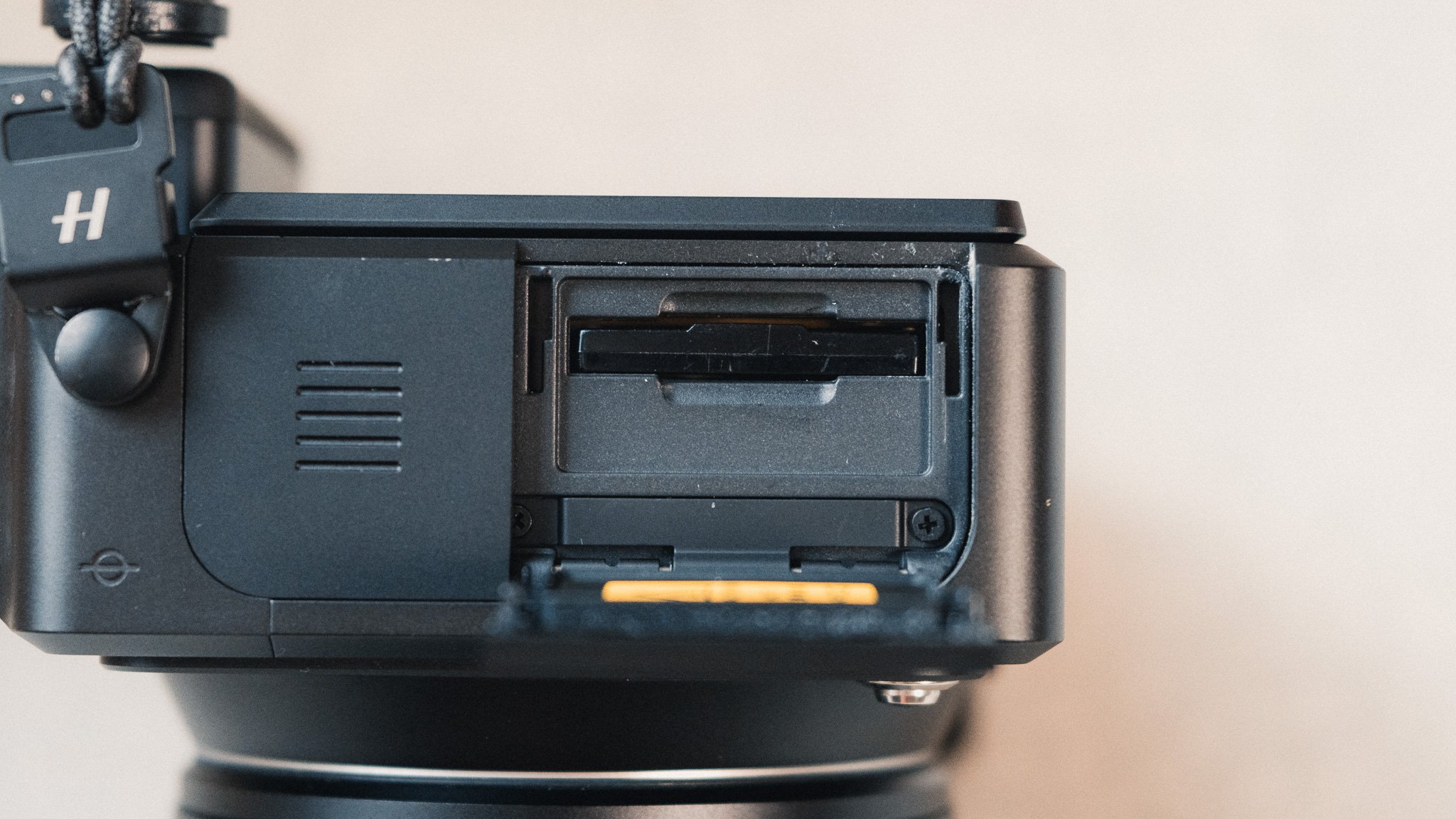
Using a fast Thunderbolt USB-C cable enables incredibly fast transfer speeds—a necessity given the large file sizes. Each RAW file averages around 220MB, so storage consumption is significant. I found myself reassessing how I shoot, carefully considering whether each shot was worth the storage space. This has made me more intentional and selective about the photos I take and keep.

Connectivity
The high-speed USB-C port serves multiple purposes:
Charging: While not blazing fast, it recharges quickly enough to be practical.
Data Transfer: The camera can be connected to a computer as an external drive for drag-and-drop simplicity.
Tethering: You can tether and control the camera via the USB-C port.
Wireless Control: Using the Phocus App, you can control the camera remotely and access live view.
Battery Life
Battery performance depends heavily on usage. If shooting intermittently and turning the camera off between shots, a single charge lasts most of the day, leaving about 10% battery at the end. Conversely, shooting frequently with the camera left on can drain a battery within a few hours.

The power-on time varies between 2–5 seconds, which can feel slow during reactive shooting scenarios like street photography. To mitigate this, I use a standby trick: tapping the power button once turns off the screen and most buttons but keeps the camera on. A tap of the shutter button wakes it in about a second, though this approach consumes slightly more battery.
Exposure
Changing exposure modes is straightforward using one of the top function buttons, and adjusting the exposure itself is effortless. To be honest, I’ve included this section mainly to highlight the lack of a multi-metering mode. When shooting in auto or semi-auto modes, you can usually tell the camera how to expose by selecting a metering mode.
Most cameras offer four metering modes:
Multi: Exposes for the entire scene to give a balanced exposure.
Centre: Focuses exposure on the middle of the frame.
Spot: Exposes for a specific area under the focus point.
Highlight: Prioritises the brightest parts of the image.
The X2D, however, only has centre and spot metering modes. Centre is the default, and in high-contrast environments, the result is often underexposure when the centre of the frame is bright. Conversely, it can lead to overexposure in darker scenes. I frequently found myself manually adjusting exposure compensation to achieve a balanced image. While not a major issue, it’s a basic feature that should be standard. I raised this with Hasselblad, and they acknowledged it; hopefully, this can be addressed with a firmware update.

Autofocus
The autofocus system can be used in two ways, but first, let’s address the system as a whole. There’s no sugar-coating it—autofocus on the X2D is slow and basic by modern standards. While not bad, it feels dated compared to other cameras in almost any price range. That said, slow focusing is typical for medium format cameras regardless of brand.

The X2D only supports AF-S, meaning there is no tracking capability, and you’re limited to two focus point sizes: small and extra small. Given the large 4:3 sensor, precise placement of the focus point is essential but delivers excellent accuracy. The system performs best with ample contrast in or around the focus area. In low-contrast areas, the camera tends to hunt for focus, and it takes longer than average to reacquire. I’d estimate a 70% hit rate overall, including both still and moving subjects. In low light, performance declines slightly but remains acceptable.

Full Autofocus
Half-pressing the shutter locks focus, allowing you to recompose or take the shot. However, once a shot is taken, the autofocus system resets, which can be frustrating if it begins to hunt again. To avoid this, you can either shoot in burst mode or enable a combination of back-button focus and manual override.
Back-Button Autofocus with Manual Override
Switching the camera to manual focus (using the body controls, not the lens) allows for back-button focusing with manual adjustments as needed. This method enhances creative control and ensures focus remains locked after acquisition.

Manual Focus
This applies to the newer lenses with manual focus override, such as the 55mm, 38mm, and 90mm f/2.5 models. Sliding the focus ring reveals the distance markings and activates manual focus mode. The experience is smooth and precise, aided by focus peaking, which makes achieving sharp focus effortless. This is one of the few digital cameras where I genuinely enjoyed the manual focusing experience.

Resolution & Crop Modes
Now we come to the real selling points of the X2D. Let’s start with resolution: 100 megapixels may sound excessive. I used to think 40 megapixels was more than enough, and even 60 felt indulgent. But after using 100 megapixels, my perspective has shifted—albeit with caveats.


The biggest advantage is the cropping potential. The sensor allows you to effectively extend the reach of prime lenses or extract vertical compositions from horizontal shots. For example, I took a full-resolution horizontal photo in Tokyo and cropped it into a vertical image. The cropped image still had a resolution of around 24 megapixels—on par with many APS-C cameras.


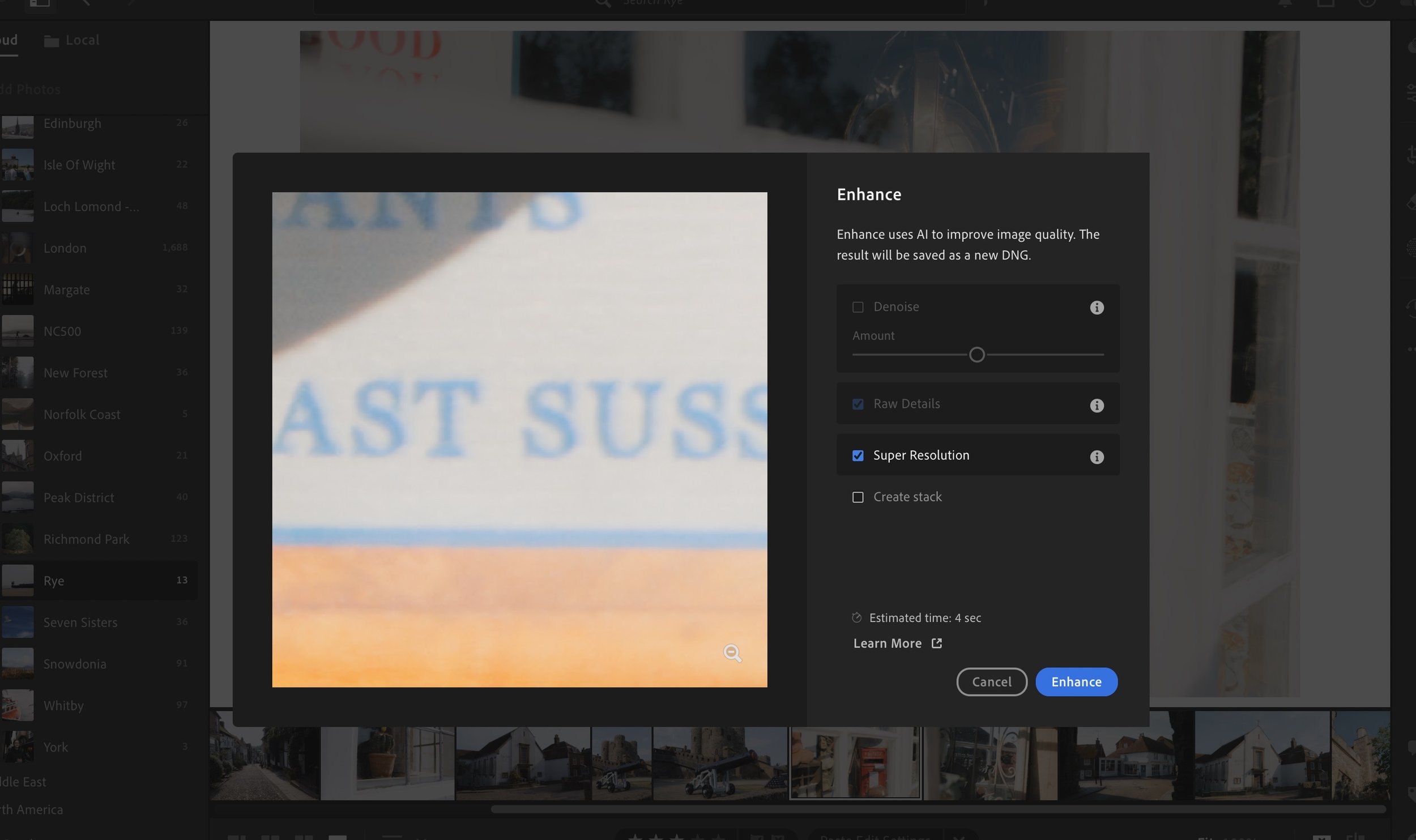
While this flexibility is impressive, it’s not reason enough alone to justify the X2D’s hefty price tag. AI-assisted upscaling tools in software like Lightroom have become so advanced that they can produce high-resolution results from lower-resolution images. For most users, this negates the need for such a high-resolution sensor.
The X2D also offers built-in crop modes, including 1:1, 16:9, and 3:2, as well as a punched-in 3:2 and the beloved XPAN crop. These are non-destructive; when imported into Lightroom, the crop is preserved but can be reverted to the original full frame. One addition I’d love to see is a vertical crop mode.


Image Quality
The image quality is so good it’s almost frustrating—because it makes every other camera look subpar in comparison. The sharpness, aided by Hasselblad’s stellar lenses, is unmatched. Colours are vivid yet natural, and the files have a distinctive look without feeling over-processed. Finally, the highlight roll-off is among the best I’ve seen. The photos below have been edited in my style.


Below are some photos with no editing at all


Capture One
At the time of writing, Capture One does not support Hasselblad RAW files due to an ongoing dispute between the companies. Even converting files to DNG doesn’t resolve the issue. I’ve heard that stripping metadata from the files might work, but I haven’t tested this yet.
Value for Money
Finally, the price. At around £7,000 for the body alone—and £11,000–£12,000 with a lens—this camera is an eye-watering investment. For the same amount, you could buy a Sony A7RV and several lenses, or two Fuji APS-C bodies, a set of lenses, and a holiday. You could even purchase a decent car. Despite its incredible performance, I can’t recommend this camera to 99% of people. If money isn’t an issue and you want the absolute best image quality, the X2D will deliver. However, for most, it represents poor value for money.
Summary
I’ve been trying to find a comparable item for this camera, and the only thing that comes to mind is a Bugatti. Just like the X2D, it’s a masterpiece of engineering, offering the pinnacle of performance from a production device. It’s crafted from premium materials, with aesthetics that turn heads. Naturally, this comes with a price tag to match, and less than 1% of enthusiasts will ever get to own one. Critics might argue that a tuned Nissan can deliver comparable performance for a fraction of the cost. While that may be true, the fact remains that—even if it outperforms the Bugatti—it’s still a Nissan.
That said, you wouldn’t buy a Bugatti to drive across Morocco—that’s what a Toyota Land Cruiser is for. You wouldn’t use it to move house—a Ford Transit would be far better. And you wouldn’t take the kids to school in a Bugatti when a hatchback would do the job more practically. Similarly, the X2D is not a jack-of-all-trades camera; in fact, it’s unsuitable for many photography applications.
Personally, I estimate the X2D will be the tool of choice for less than 10% of my photography. Yet, when I do take it out, I’ll be grinning from ear to ear—before I even glance at the incredible files it produces.


















Instead of telling you how these will change your life, I would rather be practical and answer the most common questions that people tend to have when buying presets.
What are presets?
They are editing settings that are saved in a file and can be applied to any image.
Why do people buy presets?
Sometimes because they like the work of the photographer and want that style for their own photos. Mostly because they would like to see how other people edit and learn by reverse engineering the presets. Other times it’s just to support their favourite photographers, thank you!
What’s the overall style of these presets?
- Filmic
- Warm
- Soft
- Bright
What are these presets suitable for?
Street & Travel Photography
Some Nature (with further editing)
Some Portraits (with extensive editing)
Do I actually use these?
Yes. This is the same pack I use right now for all my editing. This isn’t a pack made just to sell.
Do these presets get updated?
Yes, as my style changes, these presets will also be updated. Any time a new update is available, you will get a free update via email. Of course you also keep all the old presets in case you prefer the older looks. Only presets purchased from 2025 onwards will receive the updates.
What file types are these presets for?
- All RAW files
- JPEGs & TIFFs (not recommended)
What camera brands are these presets for?
These were designed around Fujifilm, Sony, and Leica sensors. With that said, they will work with all camera brands. While there might be differences due to individual camera colour science, the overall feel of the preset will carry over.
Will these work with JPEG files?
Yes, but you will need to reduce the intensity and make further edits. I strongly recommend editing RAW files.
Are these one click edits?
95% No. You would need to do some basic adjustments as each image is different. These adjustments can include exposure, colour balance etc. In 5% of cases you can just apply and leave it alone.
Do I need to know how to edit?
You need to have a basic understanding of adjusting exposure, highlights, shadows, etc. A more comprehensive editing skillset will let you get the most out of them.
How many presets are included?
10 in the main pack and 24 in the extras pack
Why two packs?
The main pack is what I use for 99% of my edits and is kept small to reduce wasted time scrolling through presets. The extras pack is everything I don’t use often.
What software do I need?
These presets will work with any of the following:
- Photoshop (adobe camera raw)
- Lightroom Classic
- Lightroom Desktop
- Lightroom Mobile
Will these presets work with free versions of the above software?
You need to research and double check before buying. These presets were designed for the full paid versions.
Will these presets work with very old versions of the above software?
You need to research and double check before buying. These presets were designed on and for the latest software.
What file type do I get?
XMP
What else do I get?
- Comprehensive PDF guide
Can I modify these and turn them into my own?
Yes! In fact I encourage you to modify them and play around. Use these to help you get your own style.
I have more questions…. What do I do?
Make a cup of tea and drop me an email on hello@snapsbyfox.com
Please note that due to the nature of digital products, refunds are generally not accepted. However, if you experience any issues, feel free to contact me and I’ll review your situation individually. You are welcome to use this product for personal or commercial projects, but you may not copy, distribute, or resell the files in their original or modified form.
Finally I want to say a massive thank you for supporting me. Buying these presets is the most direct way you can support my work.
Thank you!